Notifications and emails
What Run tells you about, where each notice appears, why there is no marketing mail, and what to do when emails stop arriving.
Check the bell in the workspace header for release and support updates. Most of those notices also arrive by email. Account notices, such as a password change or a ready data export, arrive by email and appear in the relevant workspace section.
If email stops arriving, you can still read the bell and open your releases and requests directly.
The bell
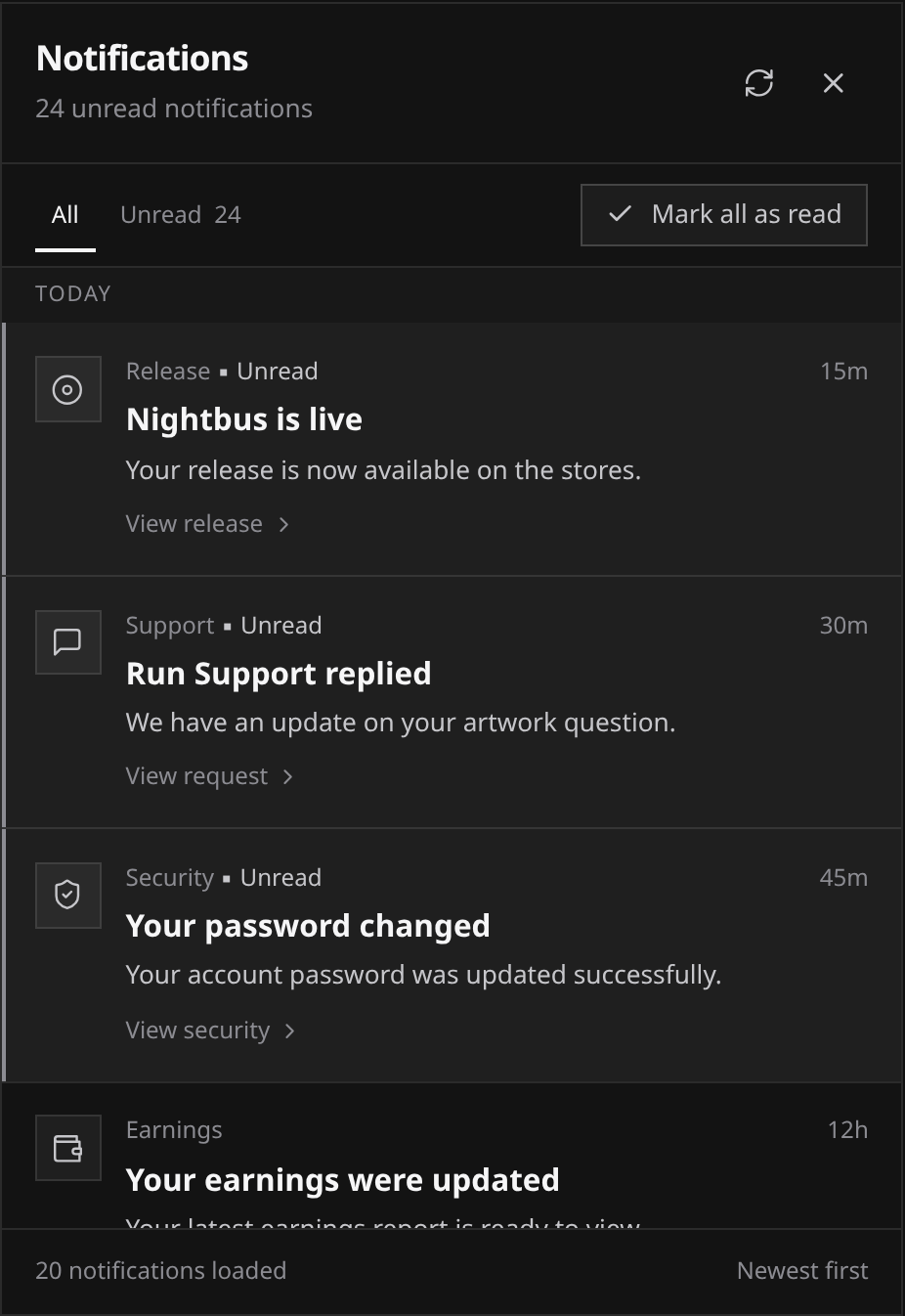
- Open the bell to see updates, newest first and grouped by day.
- Choose All or Unread to narrow the list.
- Open a notice to go to its release or support request.
- Use Load more for older notices or Refresh notifications to check for new ones.
 View full-size
Opening the bell leaves every notice as it was. Opening a notice marks it read, and Mark all as read clears the unread count across your full history. Refresh notifications checks for new updates.
Release notices open the release, and support notices open the request. The bell always belongs to your own account. If you are working in someone else’s workspace, a notice offers to open in your workspace and switches you back before showing its destination.
It holds notices about your catalog and your support requests. Account-level notices (an updated agreement, a data export, a security change) deliberately do not ring it, because the workspace shows those as state instead: a banner across the top, or the relevant section of Settings.
What Run emails you about
| Event | Bell | |
|---|---|---|
| A release is submitted and goes into review | yes | yes |
| Automated checks found problems to fix | yes | yes |
| A release is approved for delivery | yes | yes |
| A release is delivered and waiting on a future release date | yes | yes |
| A store reports a problem delivering a release | yes | yes |
| A release is rejected in review | yes | yes |
| A release is live | yes | yes |
| A takedown is underway, and again when it is done | yes | yes |
| A store re-reviews a release after it went out | yes | yes |
| A content claim is filed against a release | yes | yes |
| Run Support replies, or marks your request resolved | yes | yes |
| Your support request was received | yes | no |
| New earnings data landed for a reporting period | yes | no |
| An agreement has a new version to accept | yes | no |
| Your password or two-factor setting changed | yes | no |
| Your data export is ready, or your account was deleted | yes | no |
Sign-in mail is separate and always arrives by email only: confirming your address at signup, a sign-in link, a password reset, confirming a change of address, and one-time verification codes.
Every release email names the release in its subject line, so a full inbox still sorts.
What Run never emails you
There is no marketing mail on this system: no newsletters, no weekly digests, no milestone celebrations, no offers. Every email Run sends is a notice about something that happened on your account, which is also why there is no unsubscribe link to hunt for. The templates carry no tracking pixels.
When email stops arriving
Work through it in this order.
- Check spam and junk, and any filters or rules that might be sweeping mail from Run out of the inbox. Marking one of our emails as “not spam” helps the next one land.
- Check the address itself. Settings, Security shows the address the account signs in with, and it is the only address anything is sent to. If it is wrong or dead, see Account security and two-factor.
- Consider whether the address has been shut off at our end. Two things stop further mail to an address: it bounced repeatedly (the receiving server told us the address does not exist or refused delivery), or someone marked a Run email as spam from it. Both are respected as a do-not-mail instruction rather than retried.
- Open a request. The bell and the workspace are unaffected by any of the above, so you can still open a support request under Technical problem. Say which emails you stopped seeing and roughly when.
An address that was stopped can be put back in service once the underlying problem is fixed, which is another reason to open a request rather than waiting it out.
Where to look instead of your inbox
Email is a nudge, never the record. Everything it announces is visible in the workspace:
- Release state and store-by-store delivery on the release page. See Tracking delivery.
- Reporting periods and amounts on Earnings.
- Agreement versions and re-acceptance in Settings under Agreements. See Agreements and versions.
- Service health, when you suspect the problem is ours rather than yours, on status.run.audio.