Your data: export and deletion
How to download everything Run holds about your account, how to delete the account, what the cancellable window is for, and what deletion does not undo.
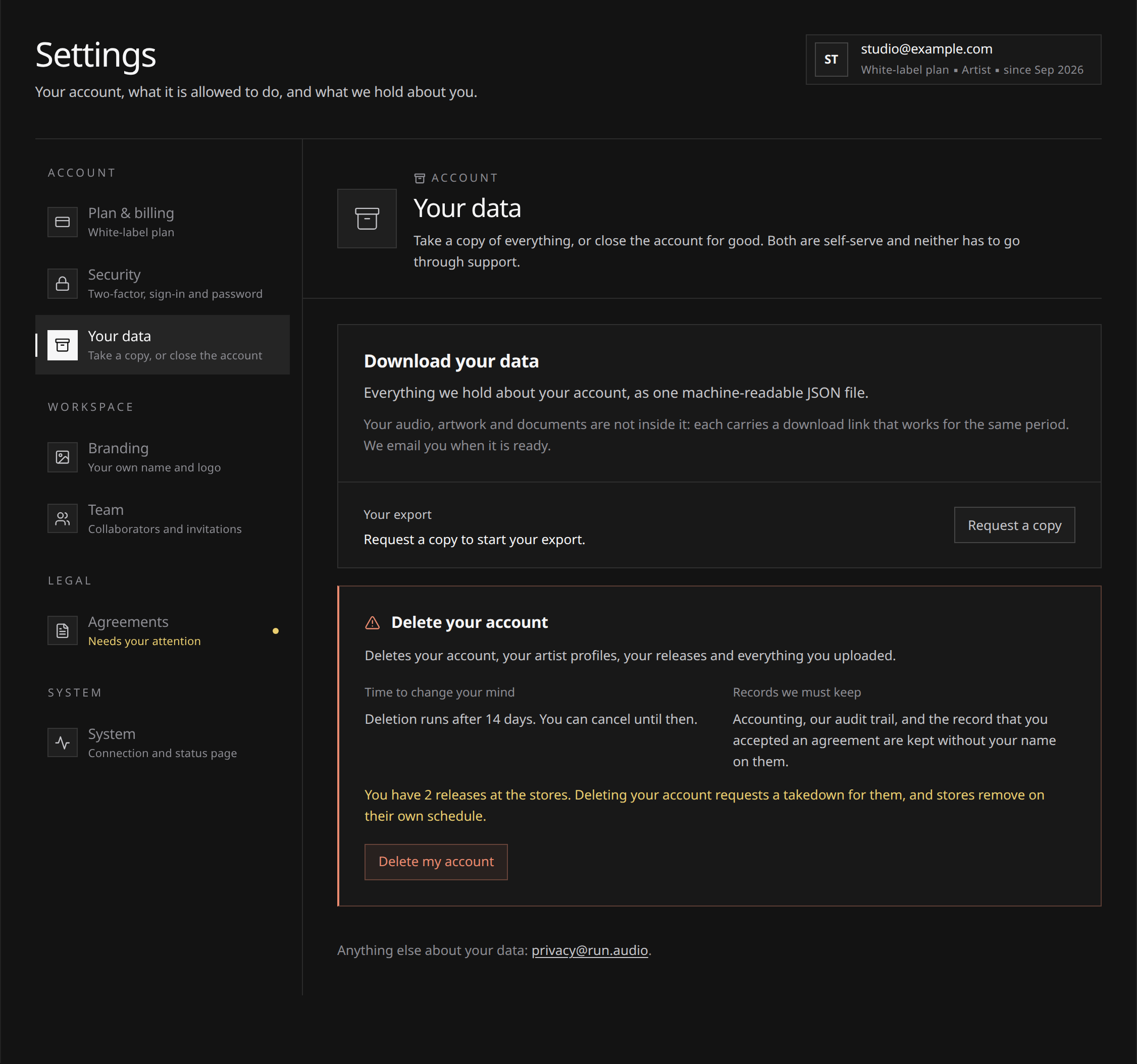
Open Settings → Your data to request a copy of your account data or schedule account deletion. Both actions are self-serve and need no reason.
Request a copy prepares a private download. Delete your account schedules permanent closure after a 14-day cancellation window. If you want a copy, export it before deleting.
 View full-size
Requesting an export
- Choose Request a copy. The panel shows the request as preparing.
- Run assembles one JSON file and stores it privately.
- When it is ready you get an email, and the panel offers a Download button.
- Each click mints a fresh download link valid for about five minutes. The bundle stays available for 7 days, and the panel prints the date it stops.
You can request one export per day; ask sooner and the panel tells you when the next one is available.
What is in the bundle
One JSON document, a structured machine-readable format any text editor will open:
- Your account record and the agreement versions you accepted.
- Your artists, your labels and your writer registry.
- Every release with its tracks, credits, splits, review findings and clearance documents.
- Earnings lines: gross amounts as reported to Run, release by release and period by period.
- Your earnings ledger: your balance, what was reported for each period with the share recorded for it, your withdrawals, and any hold on your balance with the message Run gave you.
- Your notifications, and the log of emails sent to you (what was sent and what became of it, never the bodies, which are not stored).
- Your support requests with their messages.
- Your previous export and deletion requests.
- The addresses your account has signed in from, with when each was first and last seen.
Your audio, artwork, clearance documents and support attachments are not inside the file. Each one carries a download link in the bundle instead, valid for as long as the export is.
The file opens with a readme explaining its contents, the operator and contact details.
What Run does not hold cannot be exported: what the stores hold about your listeners, what our payment provider holds about your card, what our distribution partner holds about deliveries, and what Talentir, our payout provider, holds about your payout account (the identity checks, tax details and bank or wallet details you gave it). The Privacy Policy names the payout provider and the categories of the other recipients, and privacy@run.audio will name the actual companies if you ask.
Deleting your account
Once account deletion runs, it cannot be undone. Review the effect on your releases, subscription and unpaid earnings before confirming:
- Open Settings, Your data, and expand Delete your account.
- If you have releases at the stores, tick the acknowledgement. It says plainly that deleting the account requests a takedown for them.
- Type
DELETE MY ACCOUNTin the confirmation field, exactly. - Confirm. The panel then states the date the deletion runs.
The deletion is scheduled 14 days ahead. Until it runs, Cancel in the same panel calls it off and the account carries on as normal.
Earnings still on their way. Earnings reach Run months after the plays, so some can still be on their way when you delete. If your releases were delivered to the stores, or money is still owed to you when the deletion runs, Run keeps the email address it will pay you through: for up to 12 months after the account closes, for royalties still to be reported, and after that only while money is still owed. Then it is deleted. If you expect more, open a request at Support before you delete, and Run will agree with you how what you are still owed gets paid. See Getting paid.
What deletion does to a delivered release
A release does not quietly disappear from the stores when your account goes: taking music down is a separate act, with its own timing.
- Takedowns start when you request the deletion, not when it runs. Stores remove on their own schedule, and waiting would leave music up long after the account closed.
- Cancelling the deletion does not put a release back. Anything already sent for takedown is gone from the stores, and putting it out again means a new release. See Taking a release down.
- Run keeps the minimum record needed to finish the job. Erasing everything while a takedown is still moving through the stores would leave it unfinishable, so a small record survives: the former account id, which agreement versions were accepted, some counts, and references to the delivered releases. No name, no email address, no postal address.
If what you want is your music off the stores, do the takedowns first and keep the account: a cleaner sequence, and it leaves you the release history.
Your subscription
When the deletion runs, cancelling your subscription is the first thing it does: an account that no longer exists must not keep charging a card. The subscription ends there rather than at the end of the period you paid for, and a part-used period is not refunded. Until then your plan stays live and billing carries on as normal. See Subscription and slots.
What survives a deletion, and why
Data protection law lets a company keep what it needs to defend legal claims and to meet its accounting obligations. Concretely:
- The minimum erasure record described above.
- Accounting records, including your earnings ledger and the record of the payouts made to you, which French commercial law requires Run to keep. They are kept under a reference number instead of your account, together with your releases’ identifiers, so that royalties a store reports after your account has closed are still recognised as yours. That makes them pseudonymous rather than anonymous: they no longer carry your name or point at an account, but Run can still link them to the releases they came from, and our payout provider can link a payout it made to the person it paid.
- For up to 12 months after closure if your releases were delivered, and after that only while money is still owed to you: the email address Run will pay you through, then deleted.
- Audit entries about what happened, with the actor no longer pointing at you.
- Your entry on the do-not-mail list, if there is one: deleting it would restart mail to an address that asked us to stop.
- Only if Run closed the account for breaking the rules: the IP addresses tied to it, kept on a denylist. Outliving the account is what that list is for, so erasing it with the account would defeat the point. The entry holds the address and the reason it was added, with no name, no email address and no link back to the account once it is gone. Deleting your own account never puts an address there.
Everything else goes: profile, artists, writers, releases, tracks, uploaded audio and artwork, clearance documents, support conversations and their attachments, notifications, the addresses your account signed in from, and your email log. One last email confirms the deletion, and the record of having sent it is the only trace of the address left, unless Run is keeping it to pay you (above).
Other requests
Correcting something, objecting to a use of your data, or a question about any of this: write to privacy@run.audio. The GDPR page sets the rights out in full.