How earnings work: statements, periods and payouts
The three views of the Earnings page, where the figures come from, how monthly payouts relate to store reporting, how corrections show, and how to export reports and print statements.
Open Earnings to read your balance, inspect reported royalties or download a statement. Only the account owner can see this page; collaborators cannot access any of its views.
Choose the view that matches your task:
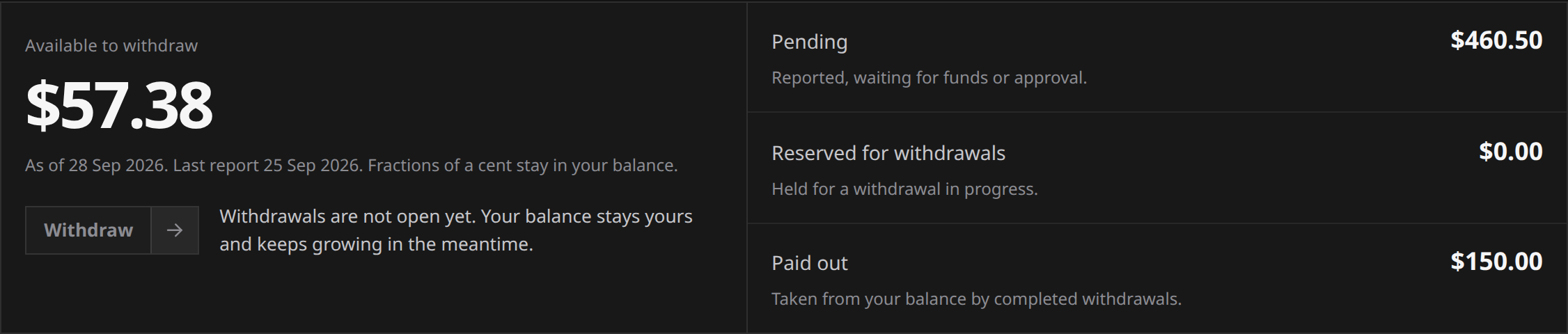
- Balance: your balance in US dollars, with what is available to withdraw, what is pending, and what is reserved or already paid out.
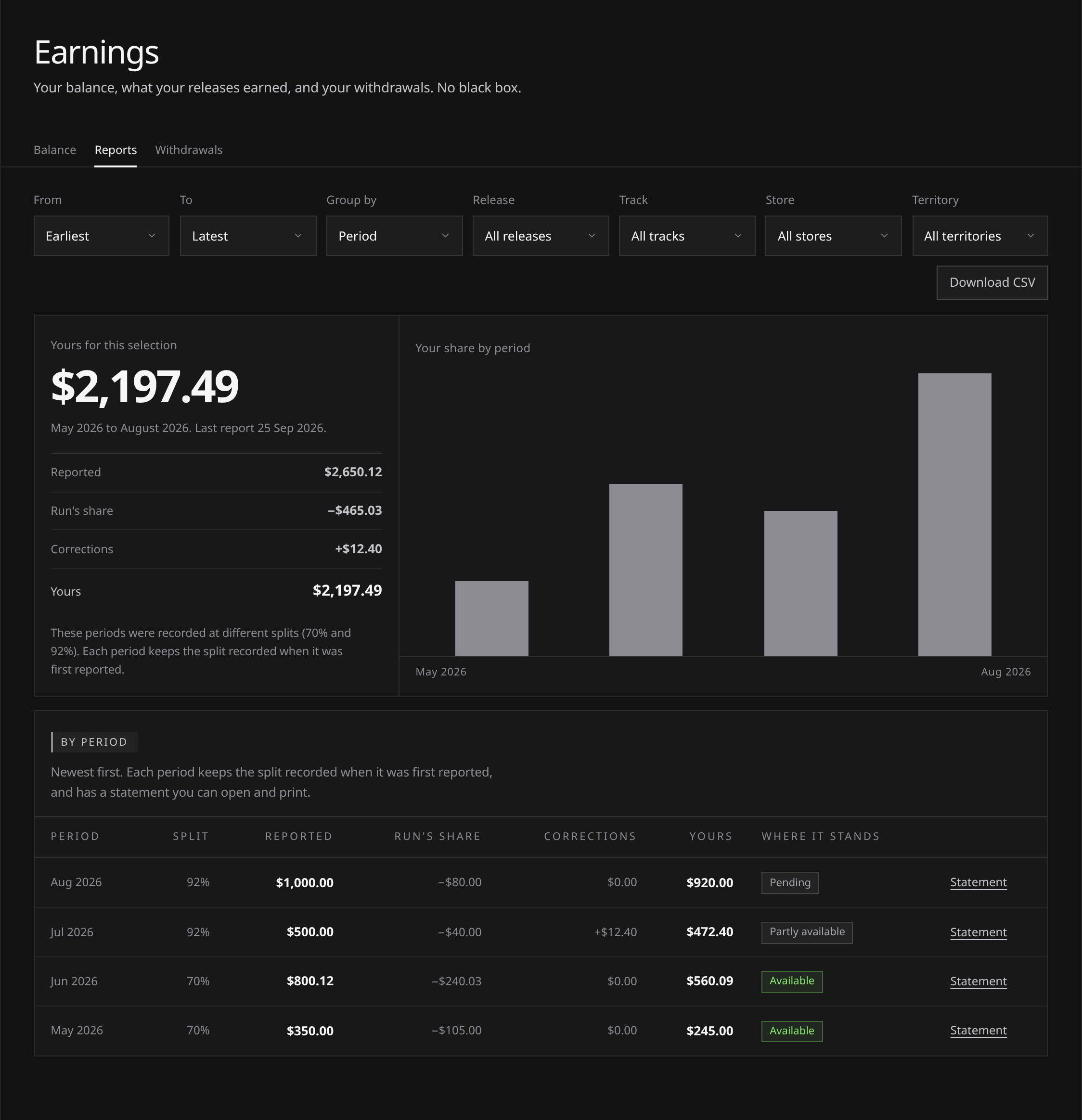
- Reports: what the stores reported for your music, with Run’s share and yours, by period, release, track, store or territory.
- Withdrawals: withdrawals from your balance, each with its status and a receipt. Withdrawals are not open yet, and the page says so.
 View full-size
Figures arrive by reporting period, after the activity happened. A new release can have plays before its first royalties appear here.
Monthly payouts
Your share is paid out to you every month through Talentir, our payout provider, in the currency and by the method you choose: the options cover 24 currencies, 10 stablecoins and 10k+ crypto tokens. Your first payout usually arrives around three to four months after your first release goes live, because the stores report and pay in arrears, and after that you are paid monthly as the platforms report your earnings.
A reporting period tells you which store activity a figure belongs to, and it comes before the payout for it: the page shows what the stores have reported, and the payout for a period follows once the stores have paid for it. Getting paid covers the timing, setting up your payout account, what it costs and tax.
Where the figures come from
- Someone plays or buys your track on a store.
- The store counts it and reports it on its own schedule, month by month and in arrears.
- That report reaches our distribution pipeline and becomes a statement covering a period.
- We check the report before using any of it: that it is complete, that it is in US dollars, and that its lines add up exactly to the total reported. A report that fails a check is not used, and a person looks at it. Each line is then matched to your release and track.
- The figures appear under Reports for that period, and your share under Pending on the Balance view.
None of steps 2 to 4 is instant. A month of plays is reported after the month has closed, and the statement carrying it is issued after that, so a period reaches your page weeks after the plays themselves. The workspace says the same thing while nothing has been reported: your balance starts when the stores report your first earnings, usually around three to four months after your first release goes live.
What a period is
A period is one calendar month of store reporting, written as a month and a year (August 2026). Every figure under Reports hangs off a period, and periods are listed newest first.
A period exists only once something has been reported for it. There is no row for a month with nothing in it, and no running figure for the month currently in progress.
Amounts are shown in US dollars, which is the currency store royalties are reported in and the currency your balance is kept in. That is the reporting currency, not the currency you are paid in: you choose that when you set up your payout account.
Reports
- Open Reports and choose the reporting periods you want to inspect.
- If needed, filter to a release, track, store or territory.
- Group the rows by Period, Release, Track, Store or Territory.
Territory means the country the store reported. Available detail depends on the store’s report; Run does not divide a release total across tracks to invent missing figures.
 View full-size
Which figures count. Grouped by period, with nothing filtered out, the figures are your balance’s own. Any other grouping or filter is detail taken from the stores’ report lines: each row’s share is worked out at its period’s split, so a breakdown can differ from the period totals by a cent here and there through rounding. The period totals are the ones your balance follows.
Analytics has its own scope for plays: all your releases together, or one release at a time.
Your share of it
Every total under Reports is shown as a short chain: what the stores reported, Run’s share of it, any corrections, and what is left for you. There is nothing hidden between the lines.
| Line | What it is |
|---|---|
| Reported | What the stores paid for your music in that period |
| Run’s share | The commission for the plan that applied when the period was recorded |
| Corrections | The net effect of corrections approved after a period was first reported |
| Yours | What is left, corrections included, which is the figure the Reports view leads with |
On either paid plan you keep 92%, and on Free you keep 70%. The split is stamped on a period the first time it is reported, so a later plan change never re-prices a month you have already seen. If a view covers periods on different terms, the page says so rather than implying one split covers all of it.
Your royalty split has the whole of it, including what the percentage applies to and what it never touches.
Figures can be restated
A period you have already seen can change. Stores correct their own reporting: a purchase refunded, a count revised, an adjustment applied to a month that had already closed.
Run never overwrites a period it has already reported to you. The original figures stay on record, and a correction appears beside them, under Corrections, once a person at Run has reviewed it. A correction lands in the period it belongs to, not in the period it arrived in, and the most recent periods are the most likely to move.
Run looks for new reports when a new statement is issued, and once a day besides. The Balance view shows the date of the last report. When a new period lands for one of your releases we email you. The mail quotes no figure, it points you at the page. See Notifications and emails.
Statements and exporting
For a printable record, open a period’s Statement from Reports. It shows the reported royalties by release, the recorded split, Run’s share, your share and any corrections. You can print or save it. A statement records royalties; it is not an invoice or proof of payment.
Download CSV in the Reports view gives you the selection as a file: one row for each period, release, track, store or territory in the grouping you chose, with the reported figure and your share, and a total. It opens in any spreadsheet, which is the usual way to hand numbers to an accountant or reconcile them against your own records. The CSV is taken from the stores’ report lines, so its share can differ from the period totals by a cent through rounding; the period totals and your statements are the figures your balance follows.
If a figure looks wrong
The Reports view shows what the stores reported, in each period, down to the release, track, store and territory they reported it for.
- Check the period range, filters and grouping you selected.
- Compare the unfiltered period totals or statement with any detailed breakdown; rounding can produce a small difference.
- Check store delivery for the release.
- If the figure still looks wrong, open a support request with the release, period and figure you are querying.