Getting help: how support works
How to open a support request in the workspace, which category to pick, the size and file limits, and what each request status means.
For help with your account or a release, open a support request. Run replies in the same workspace thread, where you can follow up and attach files.
Cannot sign in? Email support@run.audio from your account address. A person reads it, but email does not create a request in your workspace list.
Support is open on every plan, the free one included, and nothing about it is metered. Whatever your plan, we aim to respond in under 24 hours, 7 days a week. That is a target, not a guarantee, and no plan carries a guaranteed response time. What the top plan adds is a person: White-label accounts have a dedicated manager who takes their requests first and knows the catalog rather than reading it cold. See The White-label plan.
Opening a request
Have the release or label name ready, along with the error message or a screenshot if relevant. Describe what you expected and what happened instead.
- Go to New request.
- Pick a category. It decides what else the form offers you.
- Write a subject: one line on what you need.
- Write the message. Be specific: which release or track, what you expected, what happened instead.
- Link a release or a label if the form offers it, and attach files if they help.
- Send it. It appears in your list, and you get an email confirming it arrived.
The categories
| Category | Use it for |
|---|---|
| Release issue | Anything wrong with a specific release: metadata, a store that never got it, a delivery that stalled. Lets you link the release. |
| Label rename | Renaming a custom label that has already been delivered under. Lets you link the label. |
| Artist profile | Store pages connected to the wrong artist, a profile that will not link, a split catalog. |
| Billing & plan | Invoices, a failed payment, plan changes, slots. |
| Takedown help | A takedown that needs a hand, or an urgent copyright, impersonation or infringement case. Lets you link the release. |
| Technical problem | The workspace itself: an upload that will not finish, an error, emails not arriving. |
| Something else | Anything the six above do not fit. |
Taking a release down is self-serve on the release page, so use Takedown help when a takedown needs help rather than as the way to start one. See Taking a release down.
Attachments and limits
Screenshots and documents help more than a description does. A message takes up to 5 files, each up to 10 MB, and only images and PDF are accepted (PNG, JPG, WebP, GIF or PDF; no SVG). You can attach on the first message and on every reply.
| Limit | Value |
|---|---|
| Subject | 140 characters |
| Message | 5000 characters |
| Files per message | 5 |
| Size per file | 10 MB |
| Open requests at once | 10 |
Files you attach are private to your account and to Run. They are never rendered from a public address, and every download goes through a short-lived link.
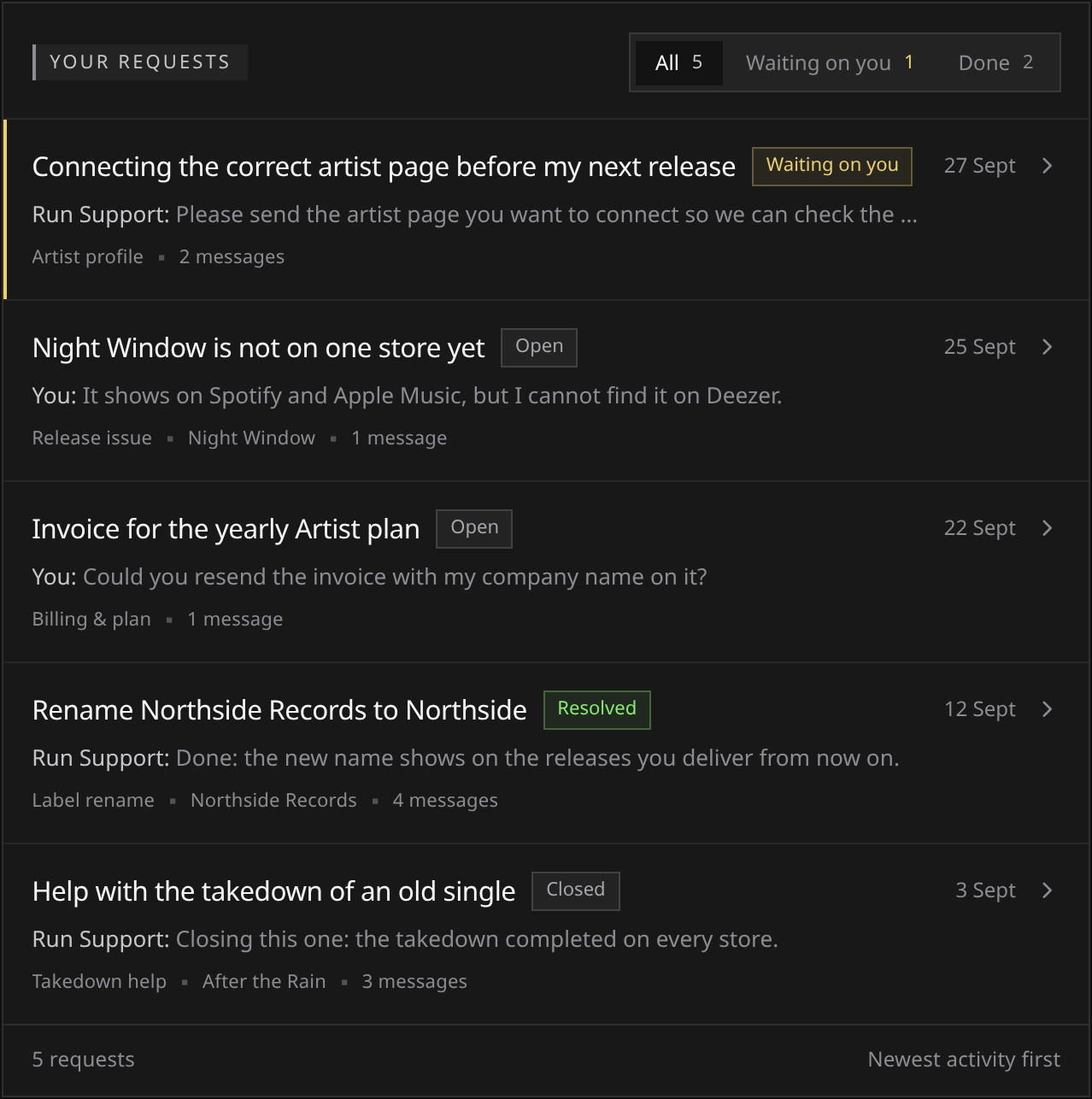
What the statuses mean
 View full-size
| Status | What it means |
|---|---|
| Open | The ball is with Run. |
| Waiting on you | The last word was ours, and the thread is waiting on your reply. |
| Resolved | Run considers it dealt with. Replying reopens it. |
| Closed | The conversation is finished. Replies are not accepted. |
Both Open and Waiting on you count against the cap of 10 open requests, so resolved and closed ones free the space again.
Replying to a resolved request reopens it and puts it back in the queue, which is the right move when the fix did not hold or the answer raised a new question. A closed request cannot be reopened from your side; the thread offers you a new request in the same category.
What the product promises is a reply in the thread, not a deadline. On every plan, we aim to respond in under 24 hours, 7 days a week: a target, not a guarantee.
Where the reply shows up
A reply rings the bell in the workspace and sends you an email. The email names the request and links it, and never carries the reply text or its attachments: those are read in the thread.
That is what the published address support@run.audio is for: it reaches a person, and it is the way in when the workspace itself is the problem. It still does not create a request or appear in your list.
Before you open one
Before opening a request, these can help with general questions or service-wide problems:
- These articles. Use Search from any Help Center page, or press Ctrl/Cmd K or /.
- Run Copilot, which answers questions about Run from these same articles: at the bottom right of the workspace, of the Run website and of this Help Center, and on the workspace’s Support page itself, under your requests. On the website and here it needs no account. It cannot see your account, so anything about your own releases still needs a request.
- status.run.audio, if you suspect something is broken rather than wrong. If an incident is running, it is written up there.
And two things that are not support requests:
- Infringement of your work by somebody else’s release, when you do not have a Run account or the release is not yours: use the route in Reporting infringement.
- Questions about the published legal documents themselves: legal@run.audio. Questions about the data Run holds on you: privacy@run.audio, or handle it yourself in Your data: export and deletion.