Your store pages: connecting them, or getting new ones
How to connect an existing Spotify or Apple Music artist page, what happens if you are new to streaming, and how Run keeps the links current.
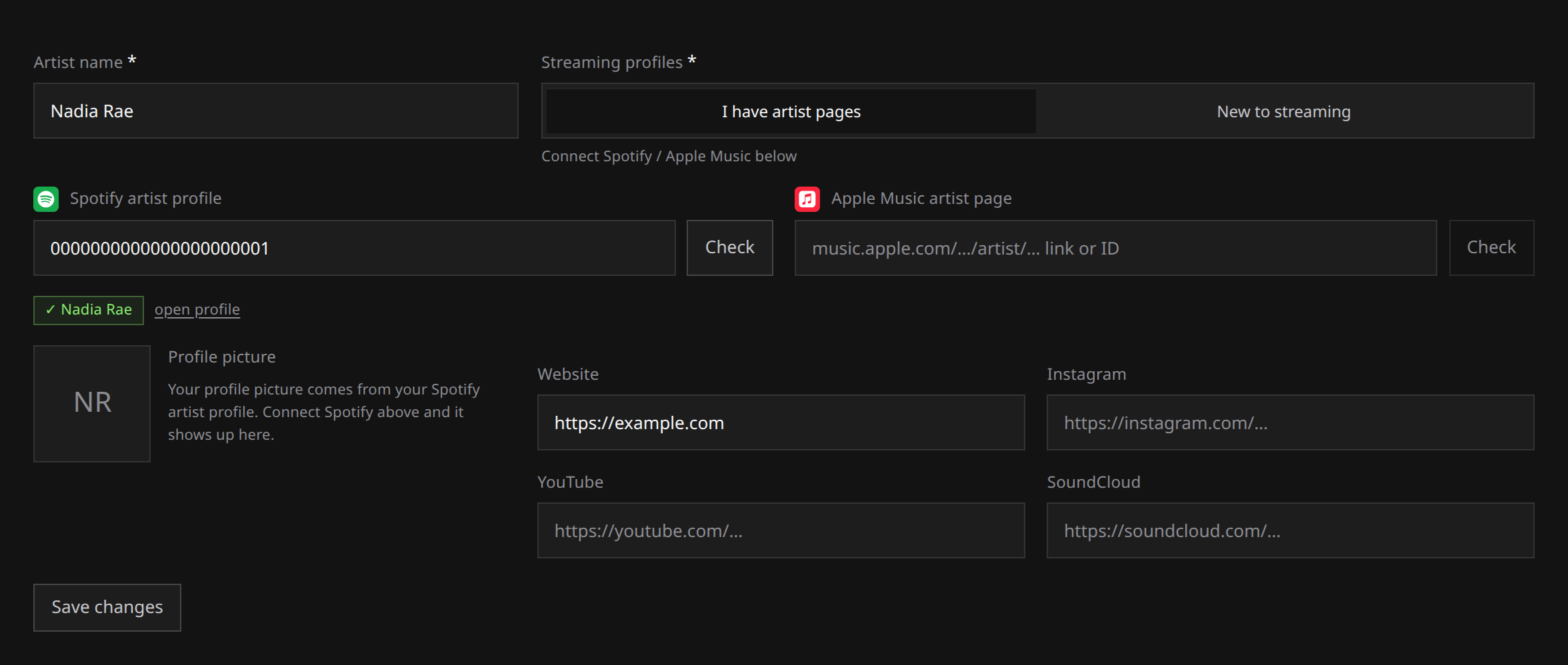
Connect your existing Spotify and Apple Music artist pages before submitting a release, so it reaches the profiles your listeners already follow. If you have never released music, choose New to streaming and the stores create your pages on first delivery.
To change this choice, open Artists, then Edit profile for the artist. Have the artist-page links ready if you already have them.
The two modes
I have artist pages. Paste your Spotify and Apple Music profile links and Run connects them. Future releases are delivered against those exact pages, so the music appears on the profile listeners already follow.
New to streaming. Pick this and there are no links to give: the fields go away. The stores create the artist pages when your first release is delivered, and Run picks up the new page identifiers afterwards and links them for you. Later releases then go to the same pages.
You pick the mode when you create the artist, and you can switch it later from Edit profile on the Artists page.
 View full-size
Why connecting matters
If an artist has pages and Run does not know about them, a store has no reliable way to tell your release apart from someone else’s music under a similar name. Either it attaches to a different artist’s page, or the store mints a second page and splits your catalog across both. Both are slow and awkward to unpick afterwards.
So an artist marked as having existing pages, with none connected, blocks the submission. The message names the artist and asks you either to paste the link or to change the mode. Credits, contributors and publishing splits lists the rest of the credit rules.
What you can paste
Paste a link, a URI or a bare identifier. Run parses it and keeps only the canonical identifier.
| Store | Accepted |
|---|---|
| Spotify | The profile link (including a localised one such as open.spotify.com/intl-fr/artist/...), a spotify:artist:... URI, or the 22 character identifier. |
| Apple Music | The artist page link with or without the name in it, an older itunes.apple.com/.../artist/id... link, or the numeric identifier. |
Anything else is refused on the spot, with a note asking for the link from your artist profile.
Spotify and Apple Music are the two stores Run connects this way. Other stores are not linked from here; where they have their own claim process, it is covered in Claim your Deezer profile and Claim your YouTube Official Artist Channel.
Verification, and the name check
- Choose I have artist pages and paste the profile link into its store field.
- Wait for Run to check it with the store.
- Compare the returned name and picture with your intended artist page.
- Save only when the result is the page you want future releases to use.
- If the store’s display name is different from the artist name you typed, you get a warning saying what the page is actually called. It is not a block, because stylings differ, but read it carefully. Releases will land on that page.
- If the store cannot be reached, Run says it could not check rather than pretending the page does not exist. Try again in a moment.
The store’s own display name is kept with the link, and our review uses it later as evidence of who this artist is.
When you are creating an artist, typing the name also searches the stores. If one of the suggestions is you, connect it in one click instead of hunting for the link.
Reading the roster
Each card carries one chip per store:
| Chip | Meaning |
|---|---|
| Connected | You pasted the link and it was verified. |
| Auto-linked | Run detected the page after a delivery and linked it for you. |
| New page on release | This artist is new to streaming and has not been delivered yet. The page arrives with the first release. |
| Detecting | A release is live and the store has not reported this page yet. |
| Link missing | The artist is marked as having pages, but none are connected. This one blocks submissions. |
Check store pages
If an artist has been delivered but a page is still missing, choose Check store pages on the artist card. Run checks whether the stores have reported a page and fills any missing link it finds.
Two things it will not do: it never overwrites a link you connected yourself, and it never invents one. It only fills a side that is empty.
Store pages can take a few days to appear after a delivery, so a check that finds nothing is normal early on. Run also re-checks on its own after every delivery, so the button is a way to look now, not the only way it happens. It is offered only once the artist has been delivered: before that there is nothing to ask about.
Repointing or disconnecting a link
Open Edit profile on the card.
- Repointing: replace the link with the right one and check it. The picture and monthly listeners belonging to the old profile are dropped in the same save, so an artist is never shown wearing someone else’s picture.
- Disconnecting: clear the field and save. That removes a link you connected.
- A page Run detected for you after a delivery is deliberately kept when you clear the field or switch to “new to streaming”. A real page the stores minted for your release should not disappear because you tidied a form.
If a release has already gone out against the wrong page, changing the link here fixes future deliveries. Open a support request about anything already delivered.