Credits, contributors and publishing splits
How display artists, song credits and publishing splits differ, the rules Run enforces on each, and what stops a release submitting.
Complete three different kinds of information:
- Display artists: the names the stores show beside the release title. Set them on the release and override individual tracks only when needed.
- Song credits: the legal names and roles of the people who made each track. These are required on every track.
- Publishing splits: optional songwriting ownership percentages. Run does not use them to split payouts.
Have each person’s first and last legal names, roles and AI involvement ready before filling in song credits.
Display artists
Add them on the Artists step of the release form. They apply to every track unless a track overrides them.
Each credited artist gets a role, and the order you put them in is the order the stores show:
- Main: the artist the release is by.
- Featured: a guest on the recording.
- Remixer: whoever made the remix.
The line reads the way it will read on a store page: Ada Mensah, Tomas Reyes feat. Leah Fry (Nightbus Remix).
The rules Run enforces:
- At least one main artist.
- At most 4 main artists. Past that, stores treat the release as a compilation and file it under Various Artists, so the submission is blocked instead.
- No artist credited twice on the same release or the same track.
- Each artist name is 2 to 64 characters.
- An artist you marked as already having store pages must have at least one profile connected. Without it, the release can land on the wrong page or create a duplicate one. See Your store pages.
Do not write “feat.” into the release or track title. Add the guest as a featured credit and the stores build the line themselves.
When a track differs
Most releases need nothing here: every track inherits the release credits, and the track’s Artists line says so. Use Customize on that line only when one track genuinely differs, for example a guest on track 3 only, or a remixer on the closing track.
A track override replaces the release line for that track alone, and it has to satisfy the same rules on its own: at least one main, at most 4, no duplicates. Artists you add in an override do not appear on the release credit line. Use release artists puts the track back to inheriting.
Song credits
These are the people behind the recording, entered by legal name rather than stage name, with both a first and a last name because the stores require both. They are saved once and reusable on every track and every release.
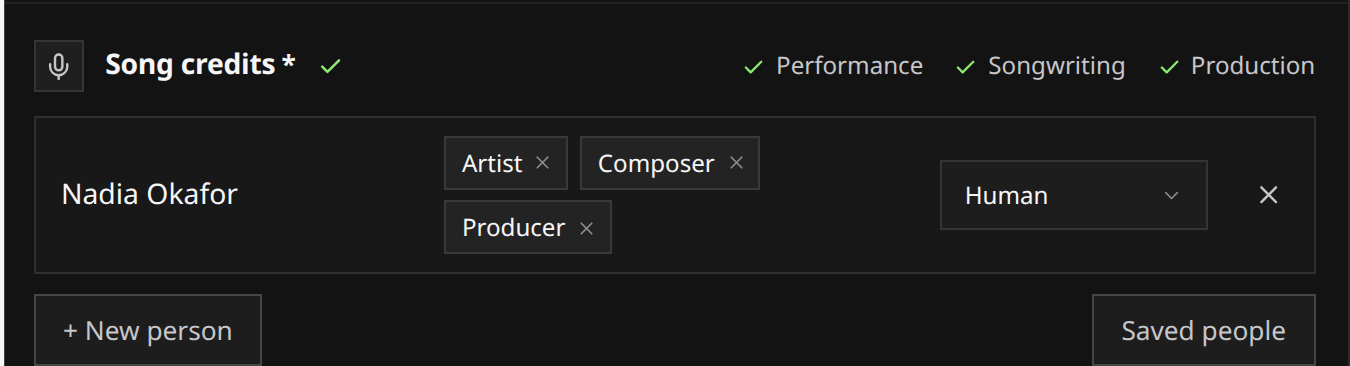
Each person carries 1 to 3 roles, picked from the store role list, and across the whole track the credits must cover three role families:
| Role family | What it covers | Example role |
|---|---|---|
| Performer | Who played or sang on the recording | Artist |
| Composition & Lyrics | Who wrote the music and the words | Composer |
| Production & Engineering | Who produced, mixed or engineered the recording | Producer |
Coverage is counted across everyone, not per person, and the Song credits heading ticks off Performance, Songwriting and Production as the track covers them. If you made the track alone, the first person you add is set up as Artist, Composer and Producer, which already covers all three. Add more people and adjust from there.
 View full-size
The rest of the rules:
- Every credited person needs at least one role, and no more than three.
- Nobody can appear twice on the same track.
- At least one contributor must not be marked as fully AI. See AI disclosure.
Each person also answers whether their own part was made with AI, one answer per person.
Deleting someone from your saved people removes them everywhere, so it is refused while they are still credited on a saved track. Remove the credits first.
Publishing splits
Splits are optional. Open Publishing splits under the track’s Rights section only if you need to record them. Skipping the section does not prevent delivery, and Run does not use these shares to divide payouts. How earnings work explains your royalty reporting.
If you do fill them in, they are strict:
- Only two roles exist here, Composer and Lyricist. Someone can hold both.
- The shares must total exactly 100. Anything else blocks the submission.
- No writer twice, and no role twice on the same entry.
- Shares take up to two decimal places. Split evenly divides them for you.
A worked example for a track written by three people, where one wrote both music and words:
| Writer | Roles | Share |
|---|---|---|
| Ada Mensah | Composer, Lyricist | 50% |
| Tomas Reyes | Composer | 30% |
| Leah Fry | Lyricist | 20% |
That totals 100, so it satisfies the split-total requirement. The track still needs its other required details before the release can submit.
What blocks a submission
Each of these stops the release at submit, and the same checks run again before a human reviews it:
- No main artist, or more than 4.
- The same artist credited twice.
- An artist with store pages declared but none connected.
- A track with no contributors, or with one of the three role families missing.
- Every contributor on a track marked as fully AI.
- Splits present that do not total 100.
What review checks covers the rest of the gate.