Importing your catalog from Spotify
How Import from Spotify turns a discography into pre-filled drafts, what comes across, and what you finish before submitting.
Use Import from Spotify to turn selected releases into pre-filled Run drafts. The page brings across published metadata. You still add the audio, cover, credits, disclosures and clearances before submitting.
Have a Spotify artist link ready, or choose a saved artist with a connected profile. If the import will add artists to your roster, check that you have room in your artist allowance.
Running an import
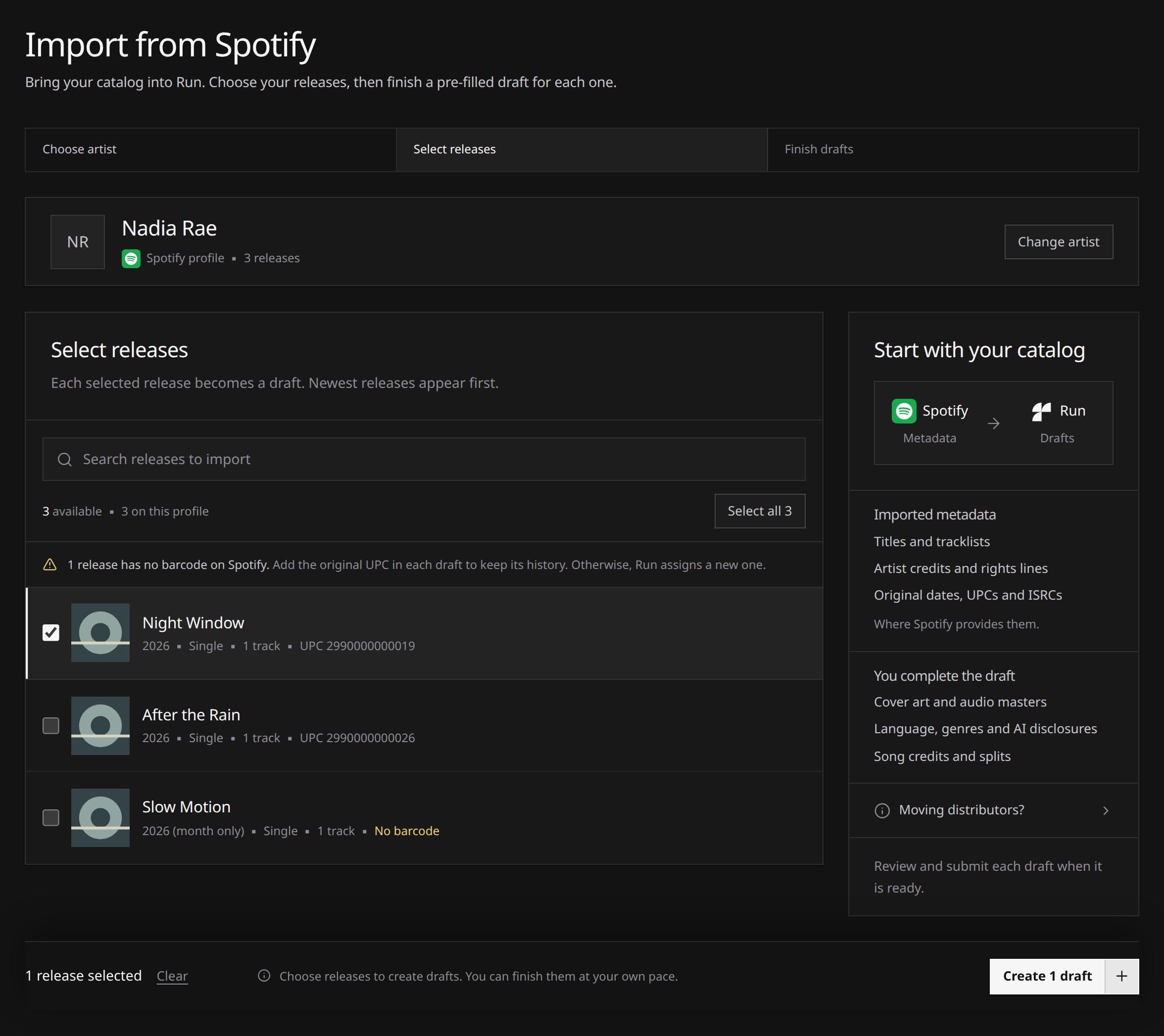
The page names three steps: Choose artist, Select releases, and Finish drafts. Finish drafts is the work inside each draft. Creating the drafts does not mark that step complete.
- Open Import from Spotify from the Releases page, from Import releases on an artist’s row on Artists, from the new release page, or from the command palette.
- Choose a saved artist with a connected Spotify profile. The card advances straight to that artist’s releases. Or paste any Spotify artist link, URI or ID. A profile that is not on your roster is added when you import it, which needs a free artist slot. Change artist reopens the list and keeps the releases already loaded. Choosing a different profile clears the selection and the search.
- Use Search releases to import when the list is long. Search looks only at releases already loaded. Load more fetches the next page. The count names how many you can import, and how many the profile has once every page is loaded. While pages remain, it names how many of that total are loaded.
- Tick the releases you want. Each row shows the cover, title, year, type, track count and barcode, newest first. A missing barcode is marked No barcode on the row, with one note above the list: add the original UPC in the draft to keep its history, or Run assigns a new one. A date Spotify gives as a year or a month only is marked on the row, and the original release date is left empty.
- Select all names how many loaded releases you can still import, such as Select all 3. While a search is active, Select shown covers only the matches, and a selection hidden by the search stays selected. Clear shown removes the matches on screen. Clear in the bar at the bottom clears the whole selection.
- Choose Create drafts. Once releases are selected, the button names the count, such as Create 1 draft. One new draft, and nothing else, opens in its editor. Several drafts, or a mix of outcomes, stay on this page. The summary counts what was created, already imported, skipped or failed, and tells you to add the cover, audio, language, genres, AI disclosures, contributors and splits. Rows that did not land stay ticked so you can try again. Leaving the page while a large import is running keeps the drafts already created and stops the ones that have not started.
 View full-size
The guide beside the list, and below it on a narrow screen, shows Spotify metadata becoming Run drafts. Imported metadata covers titles and tracklists, artist credits and rights lines, and original dates, UPCs and ISRCs, where Spotify provides them. You complete the draft covers cover art and audio masters, language, genres and AI disclosures, and song credits and splits. Open Moving distributors? for the short note on keeping the original codes and taking the old delivery down once the release is live through Run.
Releases already in your Run catalog leave the selectable list. They sit under already in Run, matched on a previous import or on the barcode, and each one links to the release. Re-importing the same release answers “already imported” rather than creating a duplicate. Delete that draft and the release becomes importable again.
Only the artist’s own releases are listed. Releases where they appear as a guest on someone else’s record are not.
What it fills in
| Field | Notes |
|---|---|
| Title | Taken literally, including any version suffix |
| Release type | Single, EP, album or compilation, read from the store’s own filing |
| Barcode | The release’s existing UPC or EAN, when the store holds one |
| Original release date | Only when the store’s date is precise to the day |
| ℗ and © lines | Parsed from the store’s copyright lines when they are readable |
| Credited artists | The release’s artists, all as main, matched to your roster or created there |
| Tracklist | Titles in order, ISRCs and explicit flags |
The release date is deliberately left empty. The original date is the release’s history; when it goes out through Run is your choice.
What it never does
- No audio and no artwork. The covers in the picker are the store’s own thumbnails, shown to help you choose. Nothing is saved to your release.
- No submitting. Everything lands as a draft, in your hands.
- No shortcuts. Imported drafts face the identical checks, review and rights confirmation.
- No extra allowance. Imports count against the same caps as anything else: credited artists count against your artist allowance, and each imported draft still has to be submitted, which is where your plan’s release allowance applies. Drafts themselves are not capped, on any plan. If the artist cap is reached part way through, what fits is imported and the rest is reported back to you, still ticked, so you can retry after freeing space.
What the import could not fill
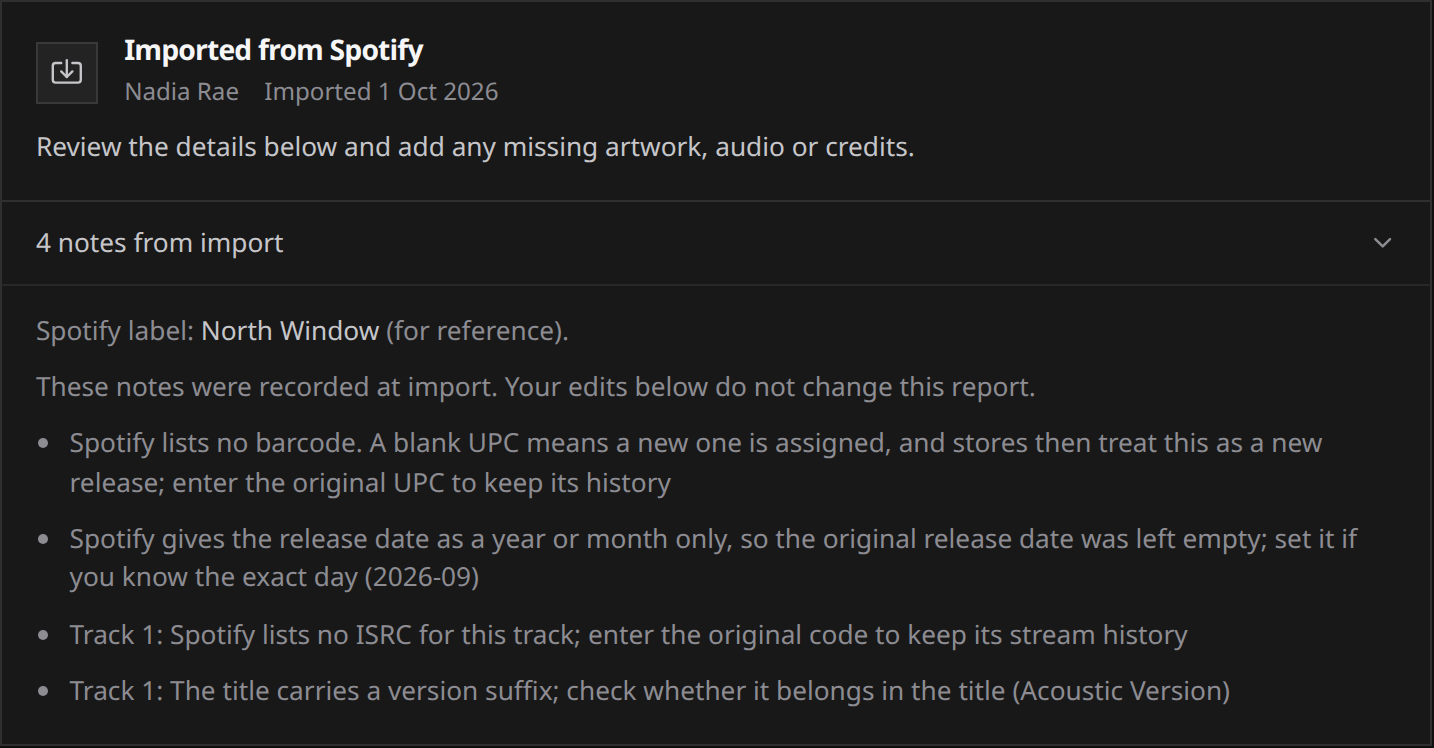
Each imported draft opens with an Imported from Spotify card. It names the Spotify profile and the import date, then asks you to review the details and add any missing artwork, audio or credits. Open notes from import, or Import details when Spotify reported no gaps, for the exact notes. Those notes were recorded when the draft was created. Editing the form does not rewrite the report. If Spotify named a label, the report shows that name for reference. It does not choose the label on your draft.
 View full-size
| Reported gap | What to do |
|---|---|
| No barcode, or an unusable one | Enter the original UPC to keep the release’s history, or leave it blank and Run assigns a new one |
| No ISRC on a track, or an unusable one | Enter the original code to keep the recording’s history, or leave it blank |
| The date was year or month only | Nothing was set. Enter the day yourself if you know it |
| A multi-disc release was flattened | Tracks are renumbered 1 upwards in one sequence. Check the running order |
| A ℗ or © line could not be read | Fill the rights lines, or leave them to default |
| A track title carries a version suffix | Decide whether it belongs in the title |
| A credited artist was skipped | Add them yourself. Placeholders such as Various Artists are never created, and neither is an artist that would exceed your allowance or collide with a name already on your roster |
Before you submit an imported draft
The import fills metadata. Everything a release needs beyond metadata is still yours to add:
- The audio master for every track, and the cover art.
- Lyrics language and genres, on the release and on each track.
- All three AI disclosures.
- Credits with their roles, and publishing splits if you use them.
- Clearance documents for any cover, public-domain work or licensed sample.
- A check of the store selection, the release date, and the credit line on each track.
Keeping it as the same release
If you are moving a release that is already on the stores, keep the barcode and the ISRCs that came across. Those codes are how a store recognises the release as the one already on your page rather than a new one. See ISRCs and barcodes.
Once the release is live through Run, take it down at your old distributor, as described in ISRCs and barcodes. Keeping the identifiers consistent helps the stores recognise the same recordings during the move. The Moving distributors? note on the import page says the same thing.