Creating a release, step by step
Every section of the Run release wizard, what each one needs, what blocks submit, and what happens once you send it.
Open New release to build a draft. Work through Release, Artists, Tracks and Stores, then use the Submit card. The step strip jumps to each section and keeps Save draft within reach.
Have your masters, cover, artist details, contributor names and any clearance documents ready. If this is your first release, the quickstart gives you a preparation checklist.
1 ▪ Release
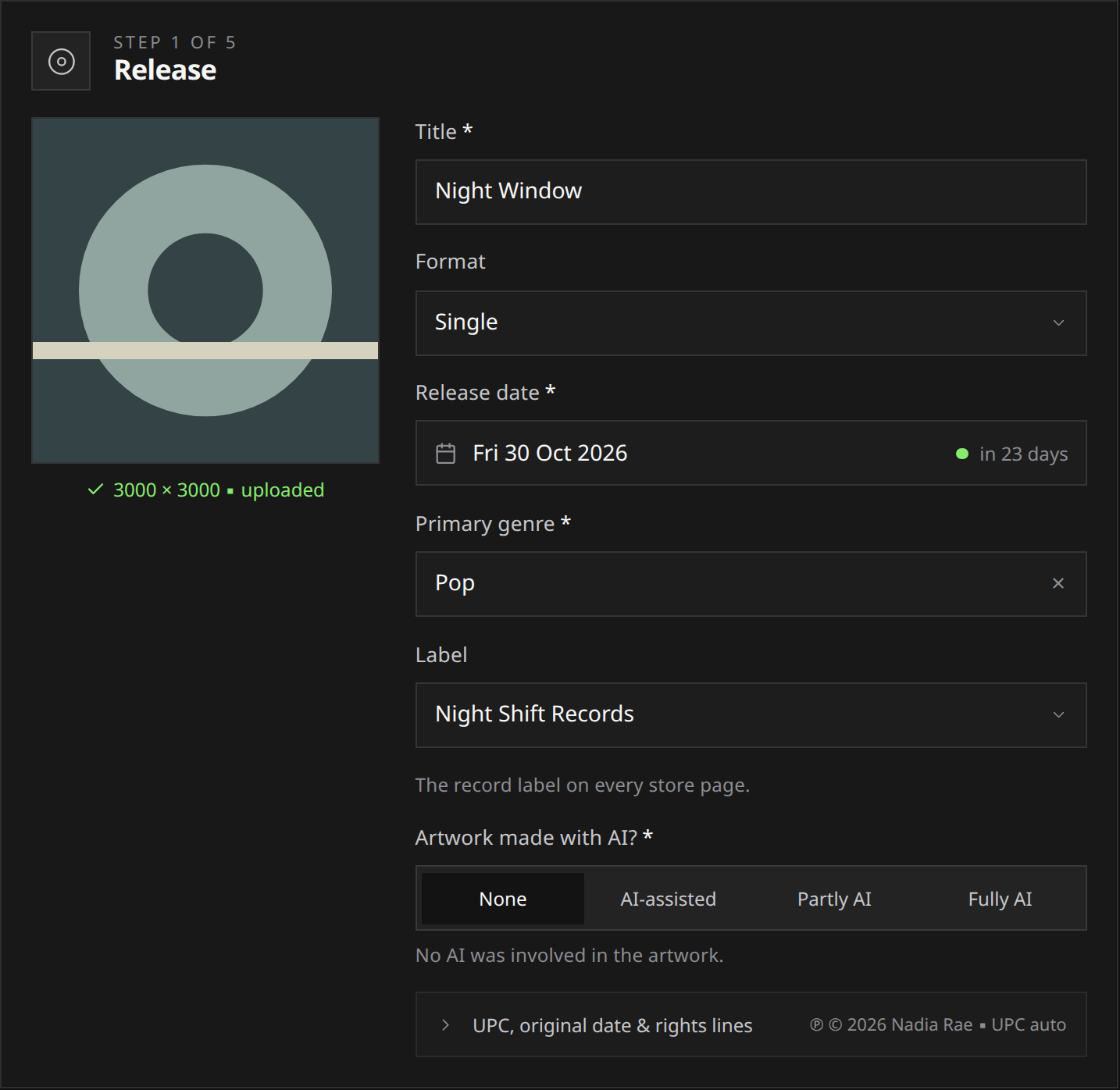
- Enter the title. This unlocks the cover upload and adding tracks.
- Set the release details. Choose the format, primary genre, and either a scheduled date or ASAP.
- Upload the cover and answer its AI disclosure. Use the table below to check the remaining fields.
| Field | What it wants |
|---|---|
| Title | The release title as it should read on store pages |
| Type | Single, EP, Album or Compilation |
| Release date | A scheduled day, or ASAP to go out once checks and review clear. See Dates below |
| Primary genre | Required. Pick from the genre list |
| UPC / EAN | Your own barcode, 12 or 13 digits. Leave it blank and Run assigns one |
| Label | Choose a label you hold, or No label to use Run on the stores |
| ℗ and © lines | Who owns the recordings and the artwork. Blank falls back to the release year and your main artist names |
| Cover art | A square JPEG, PNG or TIFF, at least 3000 by 3000 pixels, with no transparency |
| Artwork made with AI? | Required: None, AI-assisted, Partly AI or Fully AI |
More on those last three: rights lines, artwork requirements and AI disclosure. If you want your own store-facing label name, see running your own label.
The advanced fields hold your barcode, original release date and rights lines. Leave codes blank if you want Run to assign them; use the original date for music released before.
 View full-size
2 ▪ Artists
Add the artists the stores should credit, in the order their names should appear. Choose Main, Featured or Remixer for each.
- At least one main artist is required, and at most 4. Stores read more than that as a compilation.
- The same artist cannot be credited twice on the same release.
- If an artist profile says it already has store pages, at least one page has to be connected before you can submit. That is what stops the release landing on a stranger’s profile. See connecting store pages.
- If the artist is new to streaming, the stores create the pages from this release.
You can create an artist from inside this section. Artist profiles count against your plan allowance: see your roster and artist slots.
3 ▪ Tracks
- Drop your WAV or FLAC masters into Tracks. Each file becomes a track, in file-name order. A leading track number such as “01” is left out of the suggested title. You can also add a track first and upload its master later.
- Check the order and titles. Files upload one after another while you work.
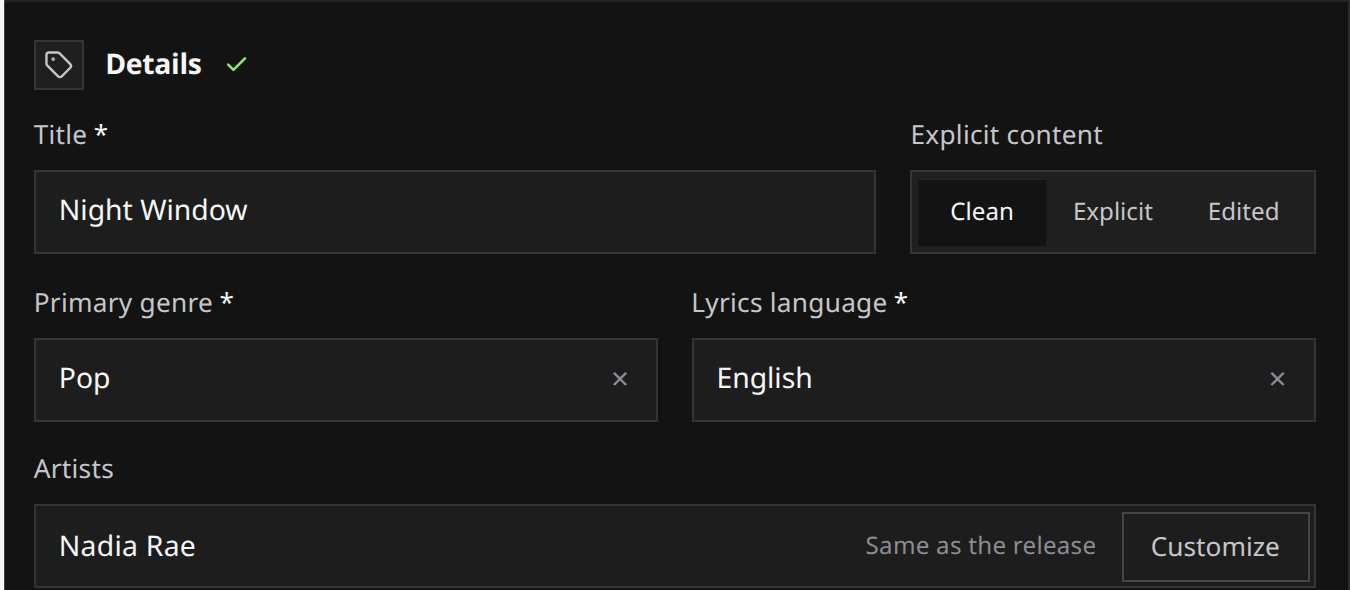
- Open a track and fill in its details. Its row shows whether it is ready or how many things remain. Moving to another track saves the open one; Save draft saves every changed track.
 View full-size
Every track carries its own metadata, its own AI disclosure and its own credits:
- Master: WAV or FLAC. Large files upload in the background and resume if the connection drops. See audio requirements.
- Details: the title, explicit content (Clean, Explicit or Edited), the primary genre and the lyrics language, all required except explicit. A new track starts with the previous track’s genre and language, or the release genre for the first. There is a code for tracks with no words. The track’s artists are the release’s unless you Customize them for that track.
- AI disclosure: two required answers per track, one for the recording and one for the songwriting.
- Song credits: every person, with one to three roles each. Across a track the credits have to cover a performing role, a songwriting role and a production role, and at least one credited person must not be marked as fully AI. First and last legal names are required, because the stores need both.
- Rights: the composition (original composition, cover song or public domain) and commercial samples (none, licensed exclusively, or licensed non-exclusively). A cover, a public-domain work or a licensed sample has to carry its clearance document on the same track before you can submit. See covers, remixes and samples.
- Publishing splits, under Rights, are optional, but if you enter any they have to total exactly 100 with nobody listed twice. See credits and splits.
- ISRC & rights lines, under Rights: your own ISRC, or leave it blank and Run assigns one, and the track’s own ℗ and © lines when they differ from the release.
4 ▪ Select stores
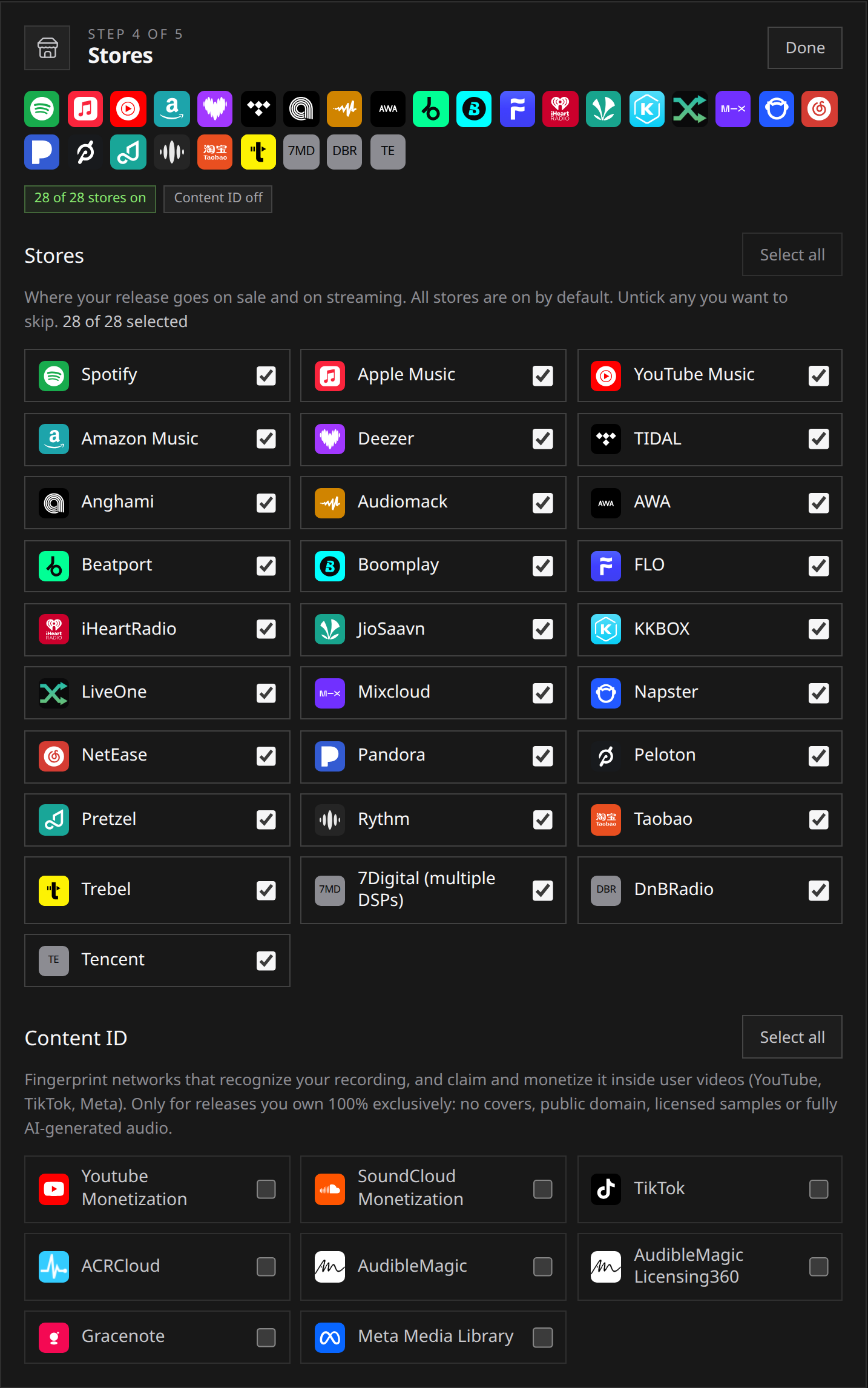
Every store is on by default. Untick any you want to skip, but at least one has to stay selected.
Content ID is separate and off unless you opt in. It claims your music inside other people’s videos, so it is only for recordings you own outright: covers, public-domain works, licensed samples and fully AI-generated audio are not eligible, and the wizard names any track that blocks it. Opting in requires ticking the ownership confirmation. See stores and Content ID.
Run delivers worldwide. There is no territory picker.
 View full-size
5 ▪ Review and submit
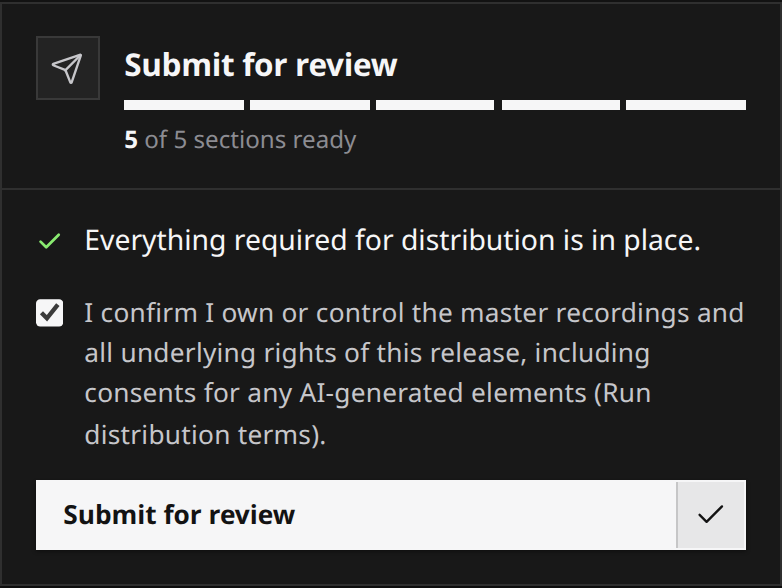
- Resolve the checklist. It lists missing release details and one line per unfinished track. Select a track’s line to open it.
- Read and tick the rights confirmation. You confirm that you own or control the recordings and underlying rights, including consent for any AI elements.
- Submit when the checklist is clear. The release locks and the automated checks start, followed by review. A clear checklist means the form is complete; it does not mean the release has passed review.
 View full-size
Dates and how fast delivery is
Once a release is approved, Run delivers it to the stores in under 24 hours. When it appears on a given store after that is the store’s own ingestion, which Run does not control and does not promise.
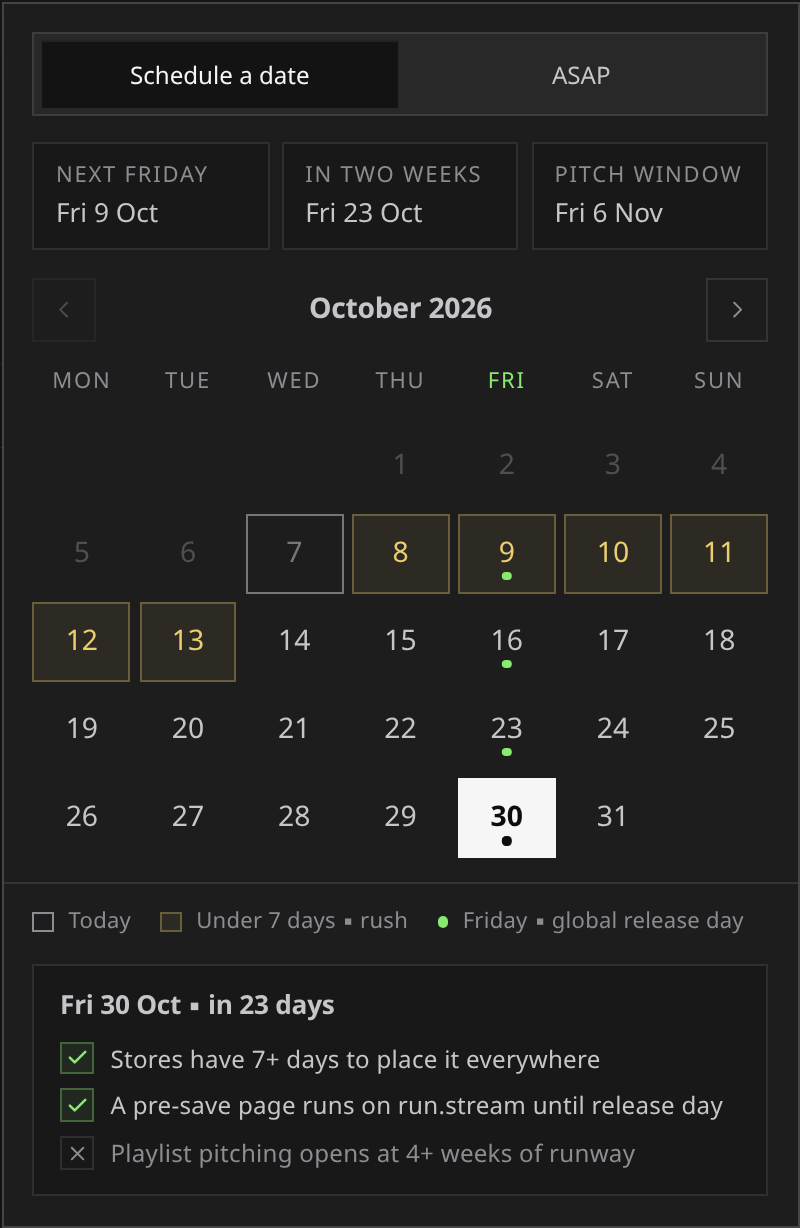
- The release date is the day you want it out. If that date is still ahead when we deliver, you get an email confirming the release is set to go live on it.
- ASAP sends the release onward once checks and review clear, without a scheduled date. It does not create a pre-save window or a pitching window.
- Leave real room. The checks, the review and the delivery all happen before that date, and the stores need their own time on top.
- A release date more than two years out is flagged for a second look.
- Original release date, in the advanced fields, records when previously released music first came out. The Spotify importer fills it when the store supplies a precise date. A scheduled release date earlier than that original date fails the checks.
 View full-size
After you submit
The automated checks run first: metadata, audio, artwork and content matching. Anything they stop is sent back to you with the reasons. Everything else goes to a person for review, and an approved release moves into delivery.
You are emailed at each step, and the release page shows where it is. See what review checks and tracking delivery. If something needs fixing, reopen the release and submit again.